

 Send Inquiry

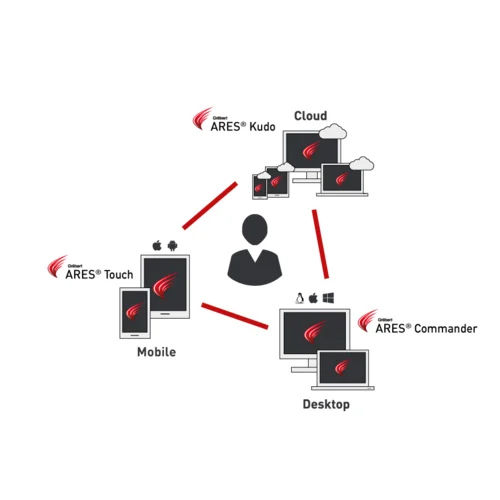
Graebert ARES Commander Trinity of CAD Software
28000.0 INR/Unit
Product Details:
- Support System Technical support provided via email, online resources and live assistance
- Security Features Flexible licensing system and user authentication
- Capacity (Person) Single user and network/multi-user options
- Usage Professional Architectural, Engineering, and Construction CAD
- Language Support Multi-language (English, German, French, Spanish, Italian, Japanese, Polish, Russian, Chinese)
- Interface Type Graphical User Interface (GUI) with Command-Line Integration
- Compatible System Works on Windows, macOS, Linux
- Click to View more
X
Graebert ARES Commander Trinity of CAD Software Price And Quantity
- 28000.0 INR/Unit
- 1 Unit
- Includes advanced import/export and conversion tools
- Optimized for large scale CAD files and high performance
- Perpetual and subscription licensing
- Minimum 1GB free disk space
- Integrates ARES Kudo for online editing and ARES Touch for mobile
- Network license management and deployment available
- DWG, DXF, DGN, PDF import/export compatibility
- Can integrate with third-party plugins and BIM add-ons
- Automatic file backup and recovery functions
- Compatible with tablets and smartphones through ARES Touch
- API and scripting for automation (LISP, C++, Visual Studio, COM/VBA, DCL support)
- Regular updates and feature enhancements
- Supports user roles, permissions, and audit trails
- Advanced print and plot features with layout management
- OpenGL-compatible graphics card recommended
- Minimum 2GB RAM required
Graebert ARES Commander Trinity of CAD Software Product Specifications
- Flexible licensing system and user authentication
- Technical support provided via email, online resources and live assistance
- Single user and network/multi-user options
- Desktop and Cloud-based CAD software
- Multi-language (English, German, French, Spanish, Italian, Japanese, Polish, Russian, Chinese)
- Professional Architectural, Engineering, and Construction CAD
- Works on Windows, macOS, Linux
- Graphical User Interface (GUI) with Command-Line Integration
- Trinity of CAD Software for 2D & 3D Design, Drafting, Annotation
- Includes advanced import/export and conversion tools
- Optimized for large scale CAD files and high performance
- Perpetual and subscription licensing
- Minimum 1GB free disk space
- Integrates ARES Kudo for online editing and ARES Touch for mobile
- Network license management and deployment available
- DWG, DXF, DGN, PDF import/export compatibility
- Can integrate with third-party plugins and BIM add-ons
- Automatic file backup and recovery functions
- Compatible with tablets and smartphones through ARES Touch
- API and scripting for automation (LISP, C++, Visual Studio, COM/VBA, DCL support)
- Regular updates and feature enhancements
- Supports user roles, permissions, and audit trails
- Advanced print and plot features with layout management
- OpenGL-compatible graphics card recommended
- Minimum 2GB RAM required
Graebert ARES Commander Trinity of CAD Software Trade Information
- Cash Advance (CA)
- 30 Unit Per Month
- 3 Days
- All India
Product Description
Graebert Trinity of CAD Flexible DWG CAD for Desktop, Cloud, and Mobile
Graeberts Trinity of CAD offers the perfect solution for engineers, architects, surveyors, and design teams who want power, flexibility, and true cross-platform workflows. The suite includes:
-
ARES Commander: Full-featured desktop 2D/3D CAD (Win/Mac/Linux), advanced DWG editing, BIM features, dynamic blocks.
-
ARES Kudo: Cloud (browser-based) DWG editing, share and access drawings online, collaboration features.
-
ARES Touch: Mobile CAD for Android/iOSedit, view, annotate DWG files on-the-go.
Key Features:
-
Single license covers desktop, web, and mobile appsedit your DWG files anywhere, anytime
-
Robust AutoCAD compatibility, advanced 2D/3D tools, PDF import/export, cloud file sync
-
Cross-device team collaboration, commenting, versioning, and shared cloud folders
-
Regular updates and support; training options available
-
Ideal for architects, engineering firms, field surveyors, multi-device workforces
Why Choose Graebert Trinity of CAD?
Ultra-flexible licensinguse on Windows, Mac, Linux, browser & mobile
Full cloud and BIM integration, superior performance for real-world CAD work
Trusted by 5 million+ users globally
Empower your remote teams, modernize your CAD workflow, and stay up-to-date with Graebert Trinity of CAD.
For demo, best offers, or technical consultation, contact us today!
Seamless Multi-Platform CAD Collaboration
ARES Commander Trinity enables professionals to transition effortlessly between desktop, cloud, and mobile platforms. Integration with ARES Kudo and ARES Touch empowers users to edit and collaborate on designs from any device or location, enhancing project agility. Real-time cloud collaboration and robust mobile support ensure your work is always accessible, making this suite ideal for dynamic teams and modern workflows across AEC industries.
Advanced File Compatibility and Customization
Supporting DWG, DXF, DGN, and PDF import/export, ARES Commander guarantees CAD file fidelity and interoperability. Its rich set of APIs-including LISP, C++, Visual Studio, COM/VBA, and DCL-allows users and developers to tailor workflows and automate processes, boosting productivity. This flexibility ensures integration with existing software ecosystems and streamlines specialized drafting requirements.
Flexible Licensing and Comprehensive Support
Choose between perpetual or subscription licensing options, with both single-user and network/multi-user models available. The software includes support for network deployment and user management roles with audit trails. Graebert provides technical assistance through email, live chat, and extensive online resources, ensuring reliable support for India's service providers and suppliers.
FAQ's of Graebert ARES Commander Trinity of CAD Software:
Q: How does ARES Commander support cloud and mobile collaboration for CAD projects?
A: ARES Commander integrates closely with ARES Kudo for cloud-based editing and ARES Touch for mobile devices. This allows users to access, view, and modify CAD drawings from desktops, tablets, or smartphones-ensuring seamless teamwork and real-time file updates across different platforms.Q: What file formats can be imported and exported using ARES Commander?
A: The software supports industry-standard CAD file formats including DWG, DXF, and DGN. It also offers PDF import and export capabilities, facilitating document sharing and compatibility with diverse engineering and design workflows.Q: What are the minimum system requirements to install and use ARES Commander?
A: ARES Commander requires at least 2GB of RAM, a minimum of 1GB free disk space, and an OpenGL-compatible graphics card for optimal performance. It is compatible with Windows, macOS, and Linux operating systems.Q: What licensing options are available for ARES Commander?
A: Users can choose between perpetual licenses for long-term use or flexible subscription licenses. Both single-user and network/multi-user licenses are offered, accommodating individual designers and large enterprises alike.Q: How can users automate or customize workflows in ARES Commander?
A: ARES Commander offers comprehensive API and scripting support, including compatibility with LISP, C++, Visual Studio, COM/VBA, and DCL. These tools enable automation, macro development, and extensive customization to fit specific project or organizational requirements.Q: Where can users find technical support or training resources for ARES Commander?
A: Technical support is available via email, live online assistance, and comprehensive help documentation. Users can also access online learning materials and community forums to find guidance and explore best practices for using the software effectively.Tell us about your requirement

Price:
Quantity
Select Unit
- 50
- 100
- 200
- 250
- 500
- 1000+
Additional detail
Mobile number
Email

Other Products in 'CAD Software' category


HERTZ INDIA INC
GST : 27AAQPD3658M1Z5

- 111, Raghuleela Mall, Kandivali West,Mumbai - 400067, Maharashtra, India
- Phone : 07971670302
- Mr. Pranav Doshi (Founder & CEO)
- Mobile : 07971670302
- hertzindiainc@gmail.com

 Send Inquiry
 Send SMS
HERTZ INDIA INC.
All Rights Reserved.(Terms of Use)
Developed and Managed by Infocom Network Private Limited.
Developed and Managed by Infocom Network Private Limited.

